|
Update Log
|
|
Date
|
Version
|
Description
|
|
27/01/2026
|
v0.0.31
|
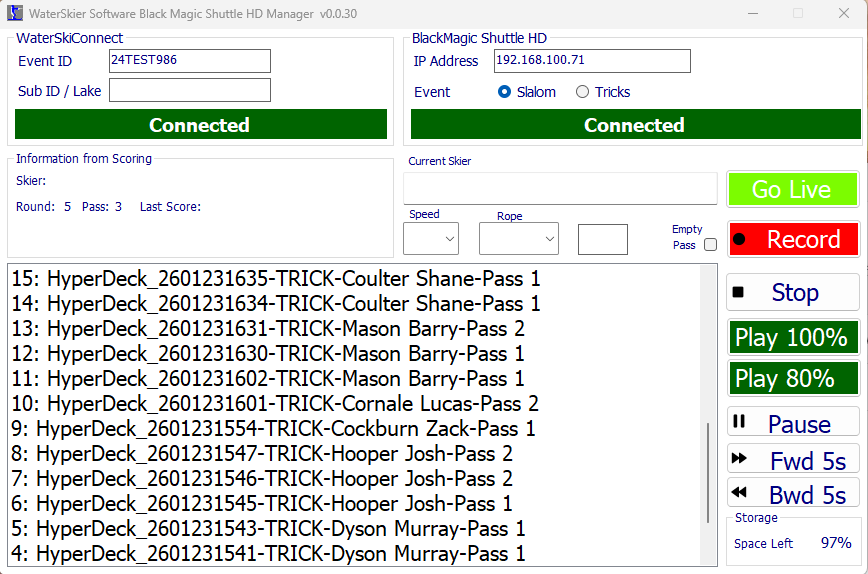
Tricks: Enable the Empty Pass check box in trick mode. Checking the box for each pass, when the boat is doing an empty/phantom pass, will prevent the software from starting the BMD from recording when the boat gets to the green buoy. Once the software sees the boat position message, it will automatically uncheck the box to stop it being left checked for the next skier. Because of this, it will need to be checked again on the boats return pass.
|
|
25/01/2026
|
v0.0.30
|
Tricks: There is an eyeTrick check box next to the Slaom/tricks radio buttons. When checked, the focus will go to record after the recording is stopped instead of play. This is beause its assumed that the video has then been captured by eyeTrick and will allow the operator to press teh space bar to start the next recording.
Tricks: The software now uses the Surepath trick boat position message to automatically start the recording when the boat reaches the green buoy. Recording will also stop automatically if the boat stops (after a fall).
Tricks: After the second pass, the next skier in the start list will automatically be selected and the pass set to Pass 1
When the software has requested the Shuttle HD to record and its gets a status of recoding, it will show a count down along side the Record text. This starts at 40 and is refreshed every 2 seconds. When the count down gets to zero, recording will be stopped. If a trick skier waits a long time before starting, its possible that the count down will get to zero before the skier has finished tricking. To extend the timer, click the record button again and it will add an additional 5 seconds to the cound down. It will add an additional 5 seconds each time the record button is clicked.
|
|
25/01/2026
|
v0.0.28
|
Move published location to new server. This required the existing application to be uninstalled and a new installer downloaded and run to install the application again. The link aboive can be used to download the installer zip file. Once downloaded, extract the file from the zip file and run the setup.exe program. The software is not signed so it will prompt you with a blue "Windows Protected your PC" warning box. This is normal. Click the More Info text and then click Run anyway to start the installer.
|